
In this article:

Duplicate analysis helps you keep your contact list clean by automatically identifying duplicate entries within your contacts.
This feature is ready to use without any additional setup directly under the "Contacts" menu item. The e-mail address serves as the unique identifier.
Please note:
E-mail addresses are treated as case-insensitive by the system. This means that Guest@evenito.com and guest@evenito.com are automatically recognized as identical. You don't need to worry about capitalization.
When does the system check for duplicates?
The system scans the database continuously in real time during the following processes:
- Creation: Whether manually entering a contact or importing a list (CSV/Excel), the system immediately detects if an e-mail address already exists.
- Editing: If a user updates an existing e-mail address to a version that is already assigned to another contact in the same event, this will also be flagged.
All matches found are conveniently grouped under the "Duplicates" tab. A counter integrated into the tab shows you at a glance how many potential cases in the current event require review.
Managing duplicates in your contact list
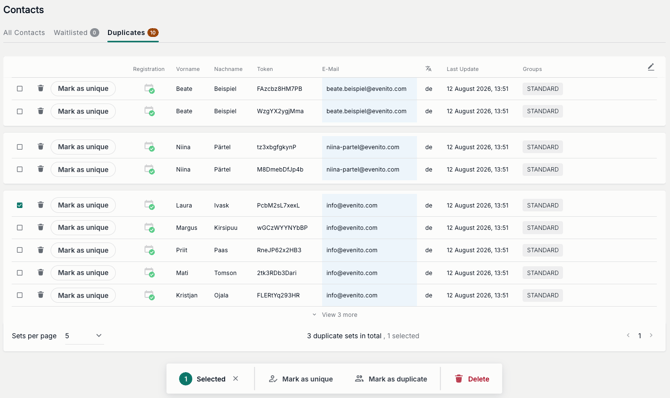
When evenito detects duplicates, you can manage them individually or in bulk under the Duplicates tab. Entries are grouped by e-mail address.
Initially, up to 5 contacts are shown per group. Click on "View X more" to expand the group or "Collapse" to minimize the view again.
Editing individual contacts
The following actions are available in each row:
- Delete contact (Trash icon): Permanently removes this specific contact from all lists (including your regular contacts).
- Mark as unique: If two entries share the same e-mail address but belong to different people, click the "Mark as unique" button. The contact will be removed from the Duplicates view and remain in your regular contact list.
- Edit contact (Pencil icon): Opens the contact details to manually adjust or merge information.
- Adjust registration status: Change the registration status directly using the icons in the "Registration" column.
- Last Update: Displays the date of the most recent change, helping you decide which entry is the most up to date.
Editing multiple contacts at once (Bulk updates)
Select multiple contacts using the checkboxes on the left. A floating menu will appear at the bottom of the screen with the following bulk options:
- Mark as unique: Marks all selected entries as independent/unique contacts at once.
- Mark as duplicate: Resets contacts back to the status of a potential duplicate.
- Delete: Permanently deletes all selected contacts from the database in bulk.
Current limitations
To ensure a smooth workflow, please keep the following conditions in mind:
- Event-specific: The duplicate check is strictly limited to the respective event. Cross-checks with other events in your space do not take place.
- No auto-merge: There is no automatic data merging feature. If needed, manually transfer or update data via the pencil icon before deleting entries.
- Empty email fields: Contacts without a saved e-mail address cannot be checked for duplicates by the system.